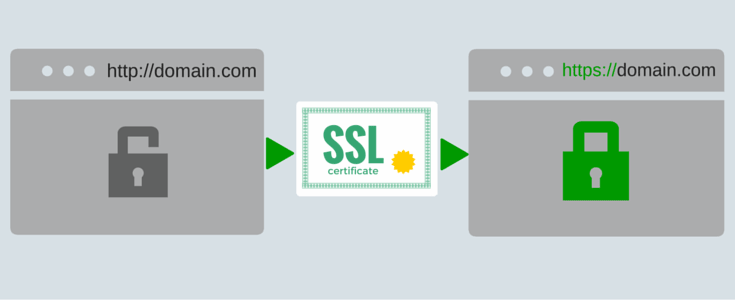
Upgrading to SSL for beginners – Why having a ‘Secure’ website is a must for your business:
Although SSL has been in the news for the past few years, with all of the challenges imposed by the pandemic, and worrying about the wellness of your family, friends and staff, it’s easy to understand how you may have let this critical piece of software fall under your radar..
If you have ignored your website security and why it matters, you’re not alone. Many business owners are still wondering whether they need to be concerned at all – and not sure what to do once they realize that their website needs to be fixed.
So I am happy you are here to give your website a heavy dose of TLC to make it secure:
So instead of this...

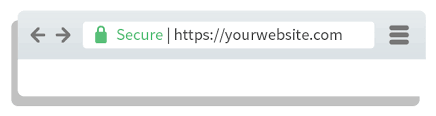
your visitors see this!
Half way down the page, you will find The 3 Steps To Making Your Website Secure. So hang in there with me, because a quick lesson first on SLL will go a long way to help you get a firm handle on things..”
What is SSL?
SSL stands for Secure Sockets Layer. That might not mean much to you, but it means a lot to Google and even a lot more to online consumers.
Here’s why:
SSL is the standard encryption used to protect web users’ information when it’s transmitted online. You may have noticed that some websites’ URLs start with:
http://
While others start with:
https://
That “s” stands for ‘secure’ and makes all the difference in the world to your website visitors.
When a visitor fills out your ‘Contact Us Form’ or gives you their personal information, whether it’s their name and email address, home address, phone number or a credit card number, they want to be confident that internet thieves and hackers can’t access their sensitive data.
So it’s these bad actors and thieves with underground software bots that will hunt out and penetrate a website that is Not secure. Go Daddy reports that 60% of all targets are small business owners which includes your website visitors – your customers.
SSL encryption is the protection shield that stands between your customers’ personal information being stolen and the online predators who want to take advantage of a website that is Not secure.
“The short answer is yes!”
And here’s why..
Google announced back in October 2018, it would start labeling any site not using SSL as ‘Not secure’. This was a change from their previous policy, which highlighted secure sites with a green padlock webicon on the browser bar.
Your visitors do not understand all the ins-and-outs of SLL and website security and won’t bother to consider that they have the option of not giving you any of their personal information – and some users also believe their computer can pick up a virus from being on your website.
Studies have shown that nearly half of all online consumers will leave to go find a website that IS secure:
A study by the John Cabot agency cited 46% of users will immediately leave a website that is Not secure.
GoDaddy says 43% of consumers abandon the site when they see a security alert message.
Another survey by SEMRush found “Nearly half of users have a bad reaction to a ‘not secure’ browser warning. With few exceptions, brands suffered diminished credibility”
Google suggests following these security and safety tips whenever you’re browsing the web: “Always look for the lock icon and the “s” in “https” in a web address to make sure the website you’re visiting is secured with encryption.”
Source: Google’s Transparency Report
- In January 2021, 89% of pages loaded in Chrome were over HTTPS
- 93.2% of the browsing time on Chrome is spent on HTTPS pages
If you have not been monitoring your website using Google analytics, you are probably not aware that many precious warm leads who landed on your site have been lost.
That’s a bad thing for obvious reasons. You want both your existing clients and potential clients to trust your website (and you!) and feel completely safe to do business with you, right?
First Impressions Are Everything
Right now, besides losing sales, a website that is Not secure is a poor representation of you and your brand and not the message you want to be sending to the world:
Your website is your online business storefront and should be treated with the same care and concern (dare I say, pride) as your offline assets.
Once you’ve properly installed your SSL certificate, Google will remove the ‘triangle’ shaped warning in the browser (or red text warning message on some device browsers) and display your URL with a gray padlock next to it. This tells customers that your site is secure.
And once it’s set up properly, it will not matter how a user types your address because any format will be secure:
mywebsite.com
www.mywebsite.com
http://mywebsite.com
and of course – https://mywebsite.com
How to Upgrade SSL
The process of upgrading your SSL and complying with all of Google’s rules can be a bit complex for beginners. You’ll have to follow several steps to get it done right. I’ll walk you through them here. And don’t worry if it seems like a hassle because if you get stuck, you can always contact me, I will help you get out of the weeds..
If you prefer to save time and bypass the learning curve, you can also jump to the end of this guide – to a service that will take care of the whole thing for you.
==> The 3 Steps To Making Your Website Secure <==
Determine What Kind of Certificate You Need
Each of the certificates listed below will inform you about how it is used to validate and protect your domain, organization, multiple domains, and, or subdomains.
- Domain Validation SSL Certificate (DV SSL)
- Organization Validation SSL Certificate (OV SSL)
- Extended Validation Certificate (EV SSL)
- Single-Domain SSL Certificate
- Multi-Domain SSL Certificate
- Wildcard SSL Certificate
- Multi Domain Wildcard SSL Certificate
From the list above, these are three main types of SSL certificates that will be best suited for over 95% of all websites and you must choose the proper one to make your site secure:
- DV SSL or Domain Validation – suitable if you only need to protect a single domain (most common)
- OV SSL or Organization Validation – to protect subdomains like this example: www.subdomain.MyBizName.com
- EV SSL or Extended Validation – to protect many domains
Most eCommerce websites will want to choose the OV or EV certificate to ensure that all areas of their entire site are secure.
DV SSL is the STANDARD and most common type of SSL certificate.
Since it is highly likely that your website will be best suited with a DV SLL certificate, I will explain a bit more about it’s profile and specifications.
Much like how it sounds, a domain validation SSL certificate allows you to validate that you do, in fact, own your website domain. This type of certificate is ideal for internal testing domains or even blog posts because they offer full encryption and basic trust indicators.
It provides security for all webpages, and it does not secure subdomains. In addition to the benefits outlined above, a DV SSL certificate offers domain validation by a trusted third party and unlimited server licenses. So if you ever decide to change your hosting server, an active DV certificate will remain valid.
1-Purchase Your Certificate
Next, you must obtain your SSL certificate to install for your website. Some hosting companies offer certificates at no cost but you also have the option of buying a custom certificate with added functionality. The costs may range from less than $50 to more than $200, depending on your needs or where you buy the certificate.
Keep in mind that the SSL certificate you buy will need to be updated regularly.
Each certificate is good for between one and two years. Most sites that issue certificates will allow you to sign up for automatic renewals, so you won’t have to worry about your certificate expiring but it will still need to be re-activated each year.
A good rule of thumb is to only pay for a premium certificate if you need to or if you use special addresses like subdomains, or sell a line products. If a standard DV certificate will suit your needs, that’s what you should install.
2-Install Your Certificate
Now that you have purchased a certificate, it’s time to install it. The specific installation process will vary depending on your host so it’s not practical to list instructions here for every possible option.
That said, the process of installing a certificate on your web server account is usually well-documented and you should be able to find instructions that tell you how to do it from your hosting company.
The tricky thing about the installation process is that it requires you to go into your hosting account and do a lot of redirecting and tweaking to your site’s code after the fact. Every link that redirects a user to the http:// version of your site must be updated to redirect them to the new https:// secure version.
It’s this part of the process that can be a bit daunting for some website owners. Without having the specific technical knowledge how to do it – and without time in their busy schedules – it can be easy to overlook links and leave a site partially or completely unprotected, as a result.
3-Test Your Site
The final step is to test your site and make sure that the SSL is working the way it’s supposed to. There are online tools you can use to do it, and your hosting company may give you a verification after you’ve completed the installation.
Just remember that testing is crucial. If you miss any step along the way, you might end up with only a partial installation.
Whew – that sounds like a lot of software to mess with, doesn’t it? Well maybe depending on how well you find your way around a mouse and keyboard, but if you take your time and go step-by-step YOU can do it!
Completely ‘Done-4-You’ Service
If you want to let a pro upgrade your website with SSL to stop Google from flagging it as ‘Not secure’ we would be pleased to do everything for you. Here is a description of the SSL Certificate product purchase and service:
Pandemic Recovery Limited Time Discount – Save $50
Select your certificate below and after you make your payment you will be taken to a short video welcome message to get started right away. Order DV SSL unless for an eComm store or if your website uses subdomains:
DV
OV or EV
$197 $147
$297 $247
30 Day Money Back Guarantee
“Your total satisfaction is 100% Guaranteed. If at anytime within thirty days of purchase you decide you do not want to make your website secure or you are unhappy for any reason we will refund your purchase price in full.”
Larry Brandel | Empire Consultants | 347 480 7727